

Teachpilates offers self-paced online Pilates instructor certification for $497; this guide connects your training decision to a tested Mindbody booking workflow. Instead of manually exchanging messages about every session, configure your teaching scope, instructor access, schedule, and booking rules so clients can reserve the right service.
- For pilates instructor mindbody setup, confirm teaching scope before publishing bookable sessions.
- Teachpilates Pilates instructor certification suits first-time instructors seeking self-paced study; apparatus teaching requires separate scope checks.
- Mindbody booking configuration is separate from course completion; do not assume credentials transfer automatically.
- Test the client booking journey before sharing your schedule publicly.
Why this matters
A bookable class is not proof that you are qualified to teach it. Your training, insurance, venue requirements, and practical readiness determine what belongs on your schedule. Booking software handles reservations, not those decisions.
Teachpilates covers anatomy, mat and Reformer instruction, cueing, and business skills through self-paced online study. Treat mat-teaching foundations and introductory Reformer concepts differently from dedicated hands-on apparatus qualification. Do not describe course completion as an independent credential or universal studio approval.
This guide is published by Teachpilates. Its 2026 workflow separates course selection, teaching readiness, and booking administration so you can make each decision on its own evidence.
Before you start
- Training and scope: Gather your course requirements, assessment instructions, and evidence of completed training. Confirm the intended teaching format with your venue and insurer before advertising it.
- Business access: Obtain access to the studio's Mindbody business account and permission to manage the relevant instructor, services, and schedule. An instructor working for a studio should use the studio's approved setup rather than create a competing booking route.
- Booking materials and the hidden dependency: Prepare your service description, location, duration, capacity, cancellation wording, and client intake process. A visible session is not necessarily bookable: instructor availability, service eligibility, and client booking permissions must agree.
Mindbody screens depend on the business configuration and your permissions. The steps below use Classes and Appointments where those labels apply, without assuming that every account has identical menus or enabled features. Ask the account administrator to complete settings you cannot access.
Training scope and service plan
Confirm your teaching scope
- Write down what you intend to teach: mat classes, private mat sessions, or apparatus-based sessions. Use plain descriptions rather than a broad title that implies unverified expertise.
- Match each proposed service to your completed training and practical preparation. Remove anything that exceeds your current scope.
- Ask the venue which training evidence, practical assessment, insurance, and other documents it requires. Get the answer before committing to a public schedule.
- Check whether additional hands-on apparatus training is necessary for your intended Reformer work. Introductory concepts are not a substitute for demonstrating apparatus teaching skills.
Expected result: You have a written list of services you are prepared and permitted to teach. Only those services proceed to booking setup.
For your 2026 enrollment decision, distinguish flexible study from readiness to teach independently. Teachpilates Pilates instructor certification offers self-paced learning, but you still need to evaluate the assessment process and any practical preparation required for your intended role.
Ask about access duration, tutor support, assessment format, resubmission requirements, and any required activities beyond online lessons. Check these terms before enrolling rather than inferring them from the phrase self-paced. Your training plan should include time to practice cueing, observe movement, and respond to learners—not only time to finish lessons.
Choose your booking format
Choose the format that matches how clients receive instruction. Do not select a private-session workflow simply because its calendar looks easier to manage.
| Booking format | Best for | Advantage | Limitation | Setup priority |
|---|---|---|---|---|
| Scheduled group class | Clients attending the same instructor-led session | One scheduled session organizes the group | Capacity and cancellation rules need careful control | Session capacity and instructor assignment |
| Private appointment | Individual instruction at an agreed time | Availability can reflect individual teaching slots | Service duration and instructor availability must align | Eligible instructor and bookable time |
Start with one clearly defined service. Expanding an untested setup multiplies the settings you must troubleshoot.
Use an example such as a 30-minute private mat session only if that duration matches your actual teaching plan. This is a planning example, not a prescribed session length or a claim about the course.
Expected result: Your service plan identifies the format, instructor, venue, duration, capacity, and client-facing description without overstating your qualifications.
Instructor access and booking configuration
Establish instructor access
- Ask the administrator to locate your existing staff record before creating another. Use the same professional name that clients will see on the schedule.
- Confirm your teaching location and the services you are authorized to deliver. Keep unrelated services out of your assignment.
- Have the administrator grant only the permissions needed for your role. Teaching sessions does not automatically require control over the entire business account.
- Check that the client-facing instructor information accurately describes your training. Remove claims of clinical expertise, apparatus qualification, or independent certification unless supported.
Expected result: The business has one correct instructor record, with appropriate access and accurate public information.
Do not share an administrator's login to bypass a permission problem. Ask the account owner to correct access. Shared credentials make it harder to establish who changed a booking or schedule setting.
Configure the service and schedule
- For a group session, use the account's Classes scheduling workflow. For an individual session, use Appointments and its service configuration.
- Enter a service name that describes the actual instruction. Keep mat and apparatus offerings distinct so clients do not book one expecting the other.
- Set the location, session duration, and instructor assignment. For group teaching, set capacity according to your venue, equipment, and ability to supervise—not merely the largest value the software permits.
- Configure the relevant instructor availability or scheduled class occurrence. Review the date and time zone, especially when teaching remotely.
- Ask the administrator to confirm the service's booking eligibility and any applicable purchase requirements. Keep these consistent with the business's published terms.
- Review cancellation, rescheduling, and attendance handling with the business owner before publishing the session.
Expected result: Your intended service appears at the correct time, with the correct instructor and location, and an eligible client can begin booking it.
For a 2026 launch, write down the agreed rules in a short setup record. Include who owns schedule changes and who responds when a client needs help; otherwise, both instructor and administrator can assume the other person is handling the request.
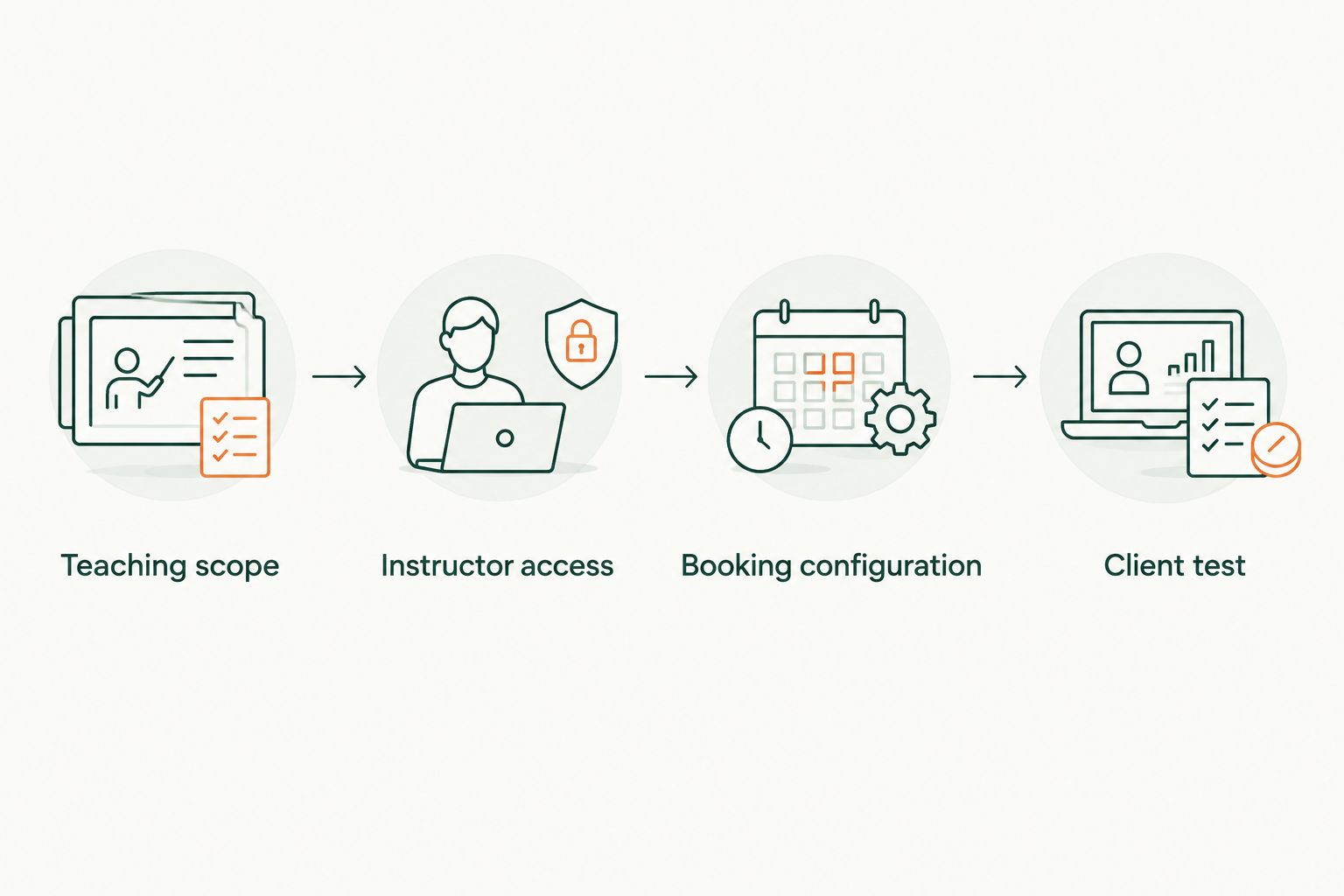
Client test and launch checks
Complete the client test
- Use an authorized test client account or ask the administrator how to test without disturbing real clients or business records. Do not assume a staff view matches the public experience.
- Open the client-facing booking route supplied by the business. Find your service by its public name, instructor, and date.
- Attempt a booking using an eligible client profile. Follow any required checkout or acceptance steps and check that the booking reaches a confirmed state.
- Inspect the booking from the staff side. Confirm the client appears against the correct instructor, session, and location.
- Check the confirmation details and any reminders the business has configured. Verify the session time, venue or remote-joining instructions, and cancellation wording.
- Test cancellation or rescheduling through the permitted client route, then remove or resolve test records according to the business's procedure.
Expected result: You can trace the same reservation from the client's action to the instructor's schedule, then confirm what happens when the client changes plans.
Use 2 test scenarios: a successful reservation and a client cancellation. These are recommended checks, not a claim that every business needs only two tests. Add further checks for waitlists, remote sessions, or other features you actually use.
Before sharing your 2026 schedule, have another person read the booking page without coaching. Ask what they believe they are booking, where they should attend, and how they would cancel. Fix any mismatch between their answer and your intended service.
Second workflow: private appointments instead of group classes
Private appointments fit individualized instruction; group classes fit a shared scheduled session. Changing formats requires more than renaming the service.
For a private-session workflow:
- Open Appointments and identify the service you will teach.
- Confirm that your instructor record is eligible for that service and location.
- Configure teaching availability that reflects your actual working time and required preparation between sessions.
- Test whether the intended session fits inside that availability. Check the complete appointment duration, not just its start time.
- Repeat the client booking and cancellation checks before publishing the route.
Expected result: Clients can reserve appropriate individual slots without being offered times you cannot teach.
The trade-off is different administration. A group class centers on a scheduled occurrence and capacity; a private appointment centers on the instructor's available time. Keep the client-facing names distinct if you offer both.
When an instructor or timetable changes, update the affected future sessions and check existing reservations. Do not assume that editing a service description or staff record automatically corrects every previously scheduled booking.
Troubleshooting
The session appears, but the client cannot book
Check client booking permissions, the booking window, capacity, and applicable eligibility requirements. Ask the administrator to inspect the specific session and client record rather than repeatedly recreating the service.
Fix: Repeat the failed action from the client-facing route after changing the relevant restriction. A visible listing alone is not a successful test.
Your name is missing from the service
Check whether the correct staff record is assigned to the service and location. Also confirm that you are looking at the intended class occurrence or appointment setup rather than a similarly named service.
Fix: Correct the assignment, then inspect the public listing. Avoid creating a second staff record as a shortcut.
No private appointment times appear
Check instructor availability, location, session duration, existing bookings, and any applicable booking restrictions. A visible gap is not necessarily long enough for the selected service.
Fix: Test a time that fully contains the appointment and falls within the instructor's configured availability.
The booking time is wrong
Compare the business location's time zone, the scheduled session, and the client's displayed booking details. Remote teaching makes this particularly important because participants can be in different locations.
Fix: Correct the underlying time setting and review affected reservations. Do not rely on a separate message that contradicts the booking confirmation.
The client receives no confirmation
First establish whether the reservation actually completed. Then inspect the client's contact details, communication preferences, and the business's confirmation configuration.
Fix: Resolve the booking or communication issue and repeat the test. An instructor's calendar entry does not prove that the client received usable attendance instructions.
Customize your workflow
Expand only after your first service passes the booking test. Add another instructor, venue, or session format separately so you can identify which change creates a problem.
Use the certification-to-first-paying-client workflow to connect booking administration with your wider teaching launch. Keep enrollment decisions separate from software decisions: choosing a course does not configure your business account or guarantee acceptance by a studio.
Before selecting Teachpilates, compare its self-paced format with the support and practical training you need. Flexibility is useful when you must organize study around existing commitments; dedicated supervised apparatus practice requires a different training arrangement.
Review your training starting point
Explore self-paced online study covering anatomy, mat instruction, introductory Reformer concepts, cueing, and business skills.
FAQ
How do I start my Pilates instructor Mindbody setup?
Confirm your teaching scope, then obtain appropriate access to the studio's Mindbody business account. Configure the instructor, service, schedule, and booking rules before testing the client journey.
Does completing a Pilates course automatically connect me to Mindbody?
Do not assume course completion creates a Mindbody instructor record or booking service. Treat training completion and business booking configuration as separate tasks.
Should I use classes or appointments for Pilates bookings?
Use a class workflow for a shared scheduled session and an appointment workflow for individual instruction. Check that the business account supports the intended format and that your permissions allow its setup.
Can introductory Reformer lessons qualify me to teach apparatus sessions?
Introductory Reformer concepts are not a substitute for dedicated hands-on apparatus qualification. Confirm your practical preparation and the requirements of your venue and insurer before offering apparatus sessions.
Can I set up bookings if I teach for an existing studio?
Yes, coordinate setup with the studio's account administrator and use its approved booking process. Your role determines which settings you can change; do not bypass restrictions with a shared administrator login.
What should I check before publishing my Pilates schedule in 2026?
Complete a client-side reservation and cancellation test before publishing your 2026 schedule. Verify the instructor, location, session time, confirmation details, and the matching staff-side reservation.
Does online Pilates certification guarantee studio acceptance?
No course should be treated as a guarantee of universal studio acceptance. Ask the intended studio about its training, assessment, audition, and documentation requirements before enrolling.
One last thing
Test the cancellation, not just the booking. A reservation proves that a client can enter your schedule; a cancellation test shows whether the client can follow your rules and whether your teaching calendar stays accurate.
Keep the completed test record with your 2026 launch checklist. Repeat the relevant checks whenever you change instructor assignments, service formats, locations, or booking rules.